
In this tutorials,I will explain to you how create a Subscribe Box with Feedburner Email subscription,Feed subscription and Social networking buttons(Digg,Twitter,Facebook,Stumbleupon,Delicious).You can easily add or remove social buttons to this widget and setup your email subscription.If you like to add this widget to your blog or a website,then follow the steps given below.
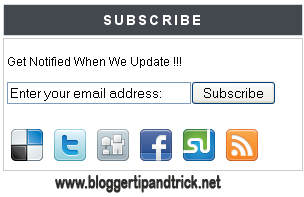
1.Log in to your dashboard--> Design- ->Page Elements.
2.Click on 'Add a Gadget' on the sidebar.
3.Select 'HTML/Javascript' and add the code given below and click save.
<style type="text/css">
#subscribe-box {
overflow: hidden;
margin: 10px 0 0 0;
}
#subscribe-box a.subscribe-sec {
display: inline-block;
display: -moz-inline-stack;
width: 40px;
padding-top: 38px;
zoom: 1;
}
#subscribe-box a.subscribe-sec:hover {
color: #660000;
}
</style>
<form action="http://feedburner.google.com/fb/a/mailverify" style="border:1px solid #ccc;padding:3px;" target="popupwindow" method="post" onsubmit="window.open('http://feedburner.google.com/fb/a/mailverify?uri=FEEDBURNER-ID', 'popupwindow', 'scrollbars=yes,width=550,height=520');return true"><p>Get Notified When We Update !!!</p><p><input style="width:180px" name="email" type="text" value="Enter your email address:" onclick="this.value='';" /><input value="FEEDBURNER-ID" name="uri" type="hidden" /><input value="en_US" name="loc" type="hidden" /><input value="Subscribe" type="submit" /></p>
<p><div id="subscribe-box">
<a title="Delicious" href="http://delicious.com/DELICIOUS-USERNAME" class="subscribe-sec" style="background: url(http://1.bp.blogspot.com/_T46SliM0-PI/TB2Wrb1EuNI/AAAAAAAAAZQ/XCYsv5xhrFY/s1600/delicious.png) center top no-repeat"></a>
<a title="Twitter" href="http://twitter.com/TWITTER-USERNAME" class="subscribe-sec" style="background: url(http://3.bp.blogspot.com/_T46SliM0-PI/TB2WqtxRIMI/AAAAAAAAAZI/7INQ-HwZQo4/s1600/twitter.png) center top no-repeat"></a>
<a title="Digg" href="http://digg.com/users/DIGG-USERNAME" class="subscribe-sec" style="background: url(http://1.bp.blogspot.com/_T46SliM0-PI/TB2WrnJnupI/AAAAAAAAAZY/qgLCPjkY7xQ/s1600/digg.png) center top no-repeat"></a>
<a title="Facebook" href="http://www.facebook.com/FACEBOOK-USERNAME" class="subscribe-sec" style="background: url(http://2.bp.blogspot.com/_T46SliM0-PI/TB2WsA5-GWI/AAAAAAAAAZg/llckeiIzHBA/s1600/facebook.png) center top no-repeat"></a>
<a title="Stumbleupon" href="http://www.stumbleupon.com/stumbler/STUMBLEUPON-USERNAME" class="subscribe-sec" style="background: url(http://3.bp.blogspot.com/_T46SliM0-PI/TB2W0KunsvI/AAAAAAAAAZw/2UZpjpyBE5s/s1600/stumbleupon.png) center top no-repeat"></a>
<a title="RSS Feed" href="http://feeds.feedburner.com/FEEDBURNER-ID" class="subscribe-sec" style="background: url(http://4.bp.blogspot.com/_T46SliM0-PI/TB2WsfPjsZI/AAAAAAAAAZo/LOPvME3a_mA/s1600/rss.png) center top no-repeat"></a>
</div></p>
</form>Note : Remember to REPLACE,
FEEDBURNER-ID with your feedburner ID.
DELICIOUS-USERNAME with your delicious username.
TWITTER-USERNAME with your twitter username.
FACEBOOK-USERNAME with your facebook username.
STUMBLEUPON-USERNAME with your stumbleupon username.
Look at the example given below.
<style type="text/css">
#subscribe-box {
overflow: hidden;
margin: 10px 0 0 0;
}
#subscribe-box a.subscribe-sec {
display: inline-block;
display: -moz-inline-stack;
width: 40px;
padding-top: 38px;
zoom: 1;
}
#subscribe-box a.subscribe-sec:hover {
color: #660000;
}
</style>
<form action="http://feedburner.google.com/fb/a/mailverify" style="border:1px solid #ccc;padding:3px;" target="popupwindow" method="post" onsubmit="window.open('http://feedburner.google.com/fb/a/mailverify?uri=blogspot/WyNa', 'popupwindow', 'scrollbars=yes,width=550,height=520');return true"><p>Get Notified When We Update !!!</p><p><input style="width:180px" name="email" type="text" value="Enter your email address:" onclick="this.value='';" /><input value="blogspot/WyNa" name="uri" type="hidden" /><input value="en_US" name="loc" type="hidden" /><input value="Subscribe" type="submit" /></p>
<p><div id="subscribe-box">
<a title="Delicious" href="http://delicious.com/wam8387" class="subscribe-sec" style="background: url(http://1.bp.blogspot.com/_T46SliM0-PI/TB2Wrb1EuNI/AAAAAAAAAZQ/XCYsv5xhrFY/s1600/delicious.png) center top no-repeat"></a>
<a title="Twitter" href="http://twitter.com/btipandtrick" class="subscribe-sec" style="background: url(http://3.bp.blogspot.com/_T46SliM0-PI/TB2WqtxRIMI/AAAAAAAAAZI/7INQ-HwZQo4/s1600/twitter.png) center top no-repeat"></a>
<a title="Digg" href="http://digg.com/users/wam8387" class="subscribe-sec" style="background: url(http://1.bp.blogspot.com/_T46SliM0-PI/TB2WrnJnupI/AAAAAAAAAZY/qgLCPjkY7xQ/s1600/digg.png) center top no-repeat"></a>
<a title="Facebook" href="http://www.facebook.com/btipandtrick" class="subscribe-sec" style="background: url(http://2.bp.blogspot.com/_T46SliM0-PI/TB2WsA5-GWI/AAAAAAAAAZg/llckeiIzHBA/s1600/facebook.png) center top no-repeat"></a>
<a title="Stumbleupon" href="http://www.stumbleupon.com/stumbler/wam83879" class="subscribe-sec" style="background: url(http://3.bp.blogspot.com/_T46SliM0-PI/TB2W0KunsvI/AAAAAAAAAZw/2UZpjpyBE5s/s1600/stumbleupon.png) center top no-repeat"></a>
<a title="RSS Feed" href="http://feeds.feedburner.com/blogspot/WyNa" class="subscribe-sec" style="background: url(http://4.bp.blogspot.com/_T46SliM0-PI/TB2WsfPjsZI/AAAAAAAAAZo/LOPvME3a_mA/s1600/rss.png) center top no-repeat"></a>
</div></p>
</form>You are done.



Thanks Buddy I installed it on my blog
http://www.trickswindow.com
so simple and usefully subscribe widget...all in one place
good ^^
thanks dude , i have put it on my site , thanks
tanks for tutorial.I'm learning
thnx i put it on my blog
http://cargoogler.blogspot.com/
waiting for more tricks
very good!
i installed it on my tech blog
www.conjurers.co.cc
@SANDEEP
cool man it worked out
Very good and helpful information. Thank you
http://mmainsideout.blogspot.com
thnks i am istalled it its working
great information...how would I add Pinterest to this box....so very helpful and much appreciated. I have added my name to subscribe to your site so I can maybe do more things myself. 🙂
Thanks! I will try this gadget out on my blog: http://myforeignlanguagecraze.blogspot.com/
thanks i m using your script in my blog , it's work
http://soft-09.blogspot.com/
this is not working.
i'm having this error. "The feed does not have subscriptions by email enabled"
you have to enable email feed subscription before use this code.