
1.Log in to your dashboard--> layout- -> Edit HTML
2.Scroll down to where you see </head> tag.
3.Now copy below code and paste it right above </head> tag.
alert("WELLCOME MESSAGE"); } MYALERT() </script> |
Note : Remember to replace WELLCOME MESSAGE with your real wellcome message.
Look at the example below;

your wellcome message will look like this.
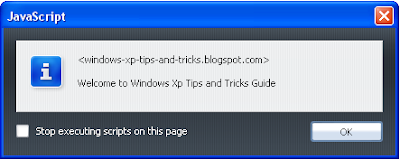
4.Now save your template and you are done.





good it work
It doesn't work anymore. You can't type or paste. Sorry.
Thanks it works.
Thanks! Is it possible to display pop up with ads? if yes, how? you would really appreciate some help
Thanks darling! This helped so much!
Maricela
vividfusion.blogspot.com
hi every person,
I identified bloggertipandtrick.net after previous months and I'm very excited much to commence participating. I are basically lurking for the last month but figured I would be joining and sign up.
I am from Spain so please forgave my speaking english[url=http://enwhatsnewtoday.info/forum].[/url][url=http://behindthescenesbr.info/].[/url][url=http://worlddiscoverylu.info/].[/url]
hey cant i add a flash popup in my site if yess please help and please visit my site gamerskonnect.blogspot.com ........
Thanks very much 🙂 my professional photography blog works well with this pop up
http://picxy.blogspot.com
It always work if I click all link in my blog. how to stop it,and only work if I Enter my blog?
check it out my blogsite! it really works! thanks for your hard work, appreciated you 🙂
hello all.. nice code..
Hello! I read here a lot at bloggertipandtrick.net and glad to be a part of the forums.