change template
How To Add Auto ‘Read More’ Feature with Thumbnails
This nice trick will automatically create post summaries with thumbnails. You don't need to add any extra code in every blogger post that you make.…
This nice trick will automatically create post summaries with thumbnails. You don't need to add any extra code in every blogger post that you make.…
Do you like to show only your blogger post title on your home page?Then follow the steps below: Note : This tutorial was updated. Now…
This will help other bloggers to follow your blogspot blog easily.To add it under your blog post, follow the steps below. 1.Log in to your…
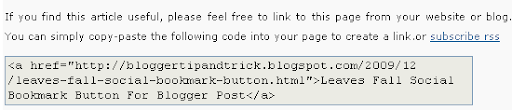
Do you like to add "Link To This Post Widget" under your blog post?This will help you to increase your site's backlinks for better SEO.So…
1.Login to your blogger dashboard--> layout- -> Edit HTML 2.Scroll down to where you see ]]></b:skin> tag . 3.Copy below code and paste it just…
1.Log in to your dashboard--> layout- -> Edit HTML 2.Click on "Expand Widget Templates" 3.Now find "Read More" text in your template. Note:It can be…
This is a great blogger hack from www.bloggerplugins.org .In this post I explain how to add this related post widget to blogger by hosting java…
1.Login to your blogger dashboard--> layout- -> Edit HTML 2.Click on "Expand Widget Templates" 3.Scroll down to where you see </head> tag . 4.Copy below…
1.Login to your blogger dashboard--> layout- -> Edit HTML 2.Click on "Expand Widget Templates" 3.Scroll down to where you see <p><data:post.body/></p> . 4.Copy below code…
1.Login to your blogger dashboard--> layout- -> Edit HTML 2.Click on "Expand Widget Templates" 3.Scroll down to where you see this: <data:post.body/> 4.Now Copy below…
1.Log in to your dashboard--> layout- -> Edit HTML 2.Click on "Expand Widget Templates" 3.Scroll down to where you see this: <p><data:post.body/></p> 4.Copy below code…
1.Log in to your dashboard--> layout- -> Edit HTML 2.Click on "Expand Widget Templates" 3.Scroll down to where you see this: <p><data:post.body/></p> 4.Copy below code…