Blogger
How To Add Zoom Effect for images in blogger
1.Log in to your dashboard--> layout- -> Edit HTML 2.Click on "Expand Widget Templates" 3.Scroll down to where you see </head> tag. 4.Now add below…
1.Log in to your dashboard--> layout- -> Edit HTML 2.Click on "Expand Widget Templates" 3.Scroll down to where you see </head> tag. 4.Now add below…
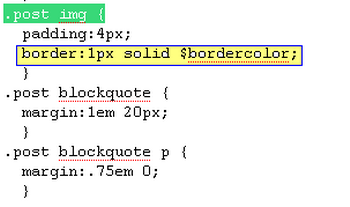
1.Log in to your dashboard--> layout- -> Edit HTML 2.Click on "Expand Widget Templates" 3.Scroll down to where you see this: .post img { 4.Now…
Adding Icons on your Every Blogger Widget , you can give a good look to your blog.Follow these simple steps to do it. 1.Log in…
1.Log in to your dashboard--> layout- -> Edit HTML 2.Click on "Expand Widget Templates" 3.Scroll down to where you see this: <p class='post-footer-line post-footer-line-2'><span class='post-labels'><b:if…
1.Log in to your dashboard--> layout- -> Edit HTML. 2.Click on "Expand Widget Templates" 3.Scroll down to where you see this: <span class='post-author vcard'><b:if cond='data:top.showAuthor'><data:top.authorLabel/><span…
First you must upload these 3 images to your hosting image service.Replace "URL of your own image" with your real Urls. 1.Log in to your…
How To Add image to the Header log in to your dashboard--> layout- -> Edit HTML, scroll to where you see this:- #header-wrapper {Add immediately…
1.Log in to your dashboard--> layout- -> Edit HTML 2.Scroll down to where you see header-wrapper code block.It will nearly look like this: #header-wrapper {width:800px;margin:0…
1.Log in to your dashboard--> layout- -> Edit HTML 2.Scroll down to where you see </head> Tag 3.Copy and Paste below CSS code above </head>…