How To Add Blink Text To Blogger
This is a very very easy work.Just insert your text as following format. <blink> Your Text Here </blink> Look at the example below. <blink> If…
There are many occasions where you want to link to a website, but you don't want to follow links on this pages.For an example we…
1.Login to your dashboard--> layout- -> Edit HTML 2.Scroll down to where you see ]]></b:skin> tag. 3.Now copy below code and paste it before ]]></b:skin>…
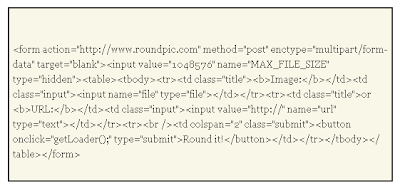
This is a very useful and simple tool.Try it if you want to create Round Image Corners to your images. 1.Login to blogger dashboard-->Layout >…
1.Login to your dashboard--> layout- -> Edit HTML 2.Scroll down to where you see </head> tag. 3.Now copy below code and paste it just before…
Upload an image to blogger and you'll see some code like this: <a onblur="try {parent.deselectBloggerImageGracefully();} catch(e) {}" href="http://4.bp.blogspot.com/_-j7_-ccACuU/Sk8S8D3yrZI/AAAAAAAAAx4/EBamLqndlVQ/s1600-h/word33.png"><img style="cursor:pointer; cursor:hand;width: 400px; height: 90px;" src="https://4.bp.blogspot.com/_-j7_-ccACuU/Sk8S8D3yrZI/AAAAAAAAAx4/EBamLqndlVQ/s400/word33.png" border="0"…
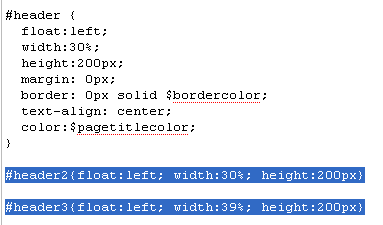
1.Log in to your dashboard--> layout- -> Edit HTML 2.Don't click on "Expand Widget Templates" 3.Scroll down to where you see like this code: #header…
1.Log in to your dashboard--> layout- ->Page Elements 2.Click on 'Add a Gadget' on the sidebar. 3.Select 'HTML/Javascript' and add the code given below and…
This is a another different method from post How To Add Horizontal LinkList in Blogger 1.Log in to your dashboard--> layout- -> Edit HTML 2.Scroll…
1.Log in to your dashboard--> layout- -> Edit HTML 2.Scroll down to where you see this: </b:skin> 3.Now copy below code and paste it just…