Blogger
Attractive Subscribe Section + Search Box For Blogger
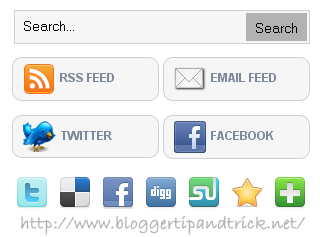
In this article,I am going to explain how to add more attractive Subscribe Section + Search Box to your blogger blog.This subscribe section is included…
In this article,I am going to explain how to add more attractive Subscribe Section + Search Box to your blogger blog.This subscribe section is included…
1.Login to your blogger dashboard--> layout- -> Edit HTML 2.Scroll down to where you see </head> tag . 3.Copy below code and paste it just…
1.Login to your blogger dashboard--> layout- -> Edit HTML 2.Scroll down to where you see </head> tag . 3.Copy below code and paste it just…
1.Login to your blogger dashboard--> layout- -> Edit HTML 2.Scroll down to where you see </head> tag . 3.Copy below code and paste it just…
1.Log in to your dashboard--> layout- -> Edit HTML 2.Scroll down to where you see this: ]]></b:skin> 3.Now add below code just above ]]></b:skin> tag.…
1.Login to your dashboard--> layout- ->Page Elements 2.Click on 'Add a Gadget' on the sidebar. 3.Select 'HTML/Javascript' and add the code given below and click…
1.Login to your dashboard--> layout- ->Page Elements 2.Click on 'Add a Gadget' on the sidebar. 3.Select 'HTML/Javascript' and add the code given below and click…
1.Login to your blogger account.Go Layout --> Add a Gadget --> Select “HTML/JavaScript”. 2.Copy below code and paste it.Click save and refresh your site. <p…