Blogger
How To Display HTML Elements/Text only on blogger homepage
1.Login to your blogger dashboard--> layout- -> Edit HTML 2.Now Add your HTML Code or Text As the Example below. <b:if cond='data:blog.pageType != "item"'>ENTER-YOUR- HTML…
1.Login to your blogger dashboard--> layout- -> Edit HTML 2.Now Add your HTML Code or Text As the Example below. <b:if cond='data:blog.pageType != "item"'>ENTER-YOUR- HTML…
1.Login to your dashboard--> layout- -> Edit HTML 2.Click on "Expand Widget Templates" 3.Scroll down to till you see this : <div class='post-header-line-1'/> 4.Now add…
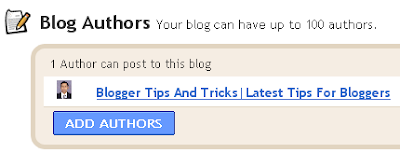
1.Login to Blogger Dashboard. 2.Click on "Settings" on your dashboard 3.Now click "Permissions" tab. 3.Under Blog Authors click on the "ADD AUTHOR" button. 4.Enter the…
This toolis very helpful to blogger. 1.Login to your dashboard--> layout- -> Edit HTML 2.Click on "Expand Widget Templates" 3.Scroll down to till you see…
When you log into your blogger account,If you load your blogger website in same browser you can see quick editing buttons near your blogger widgets.If…
This is a very very easy work.Just insert your text as following format. <blink> Your Text Here </blink> Look at the example below. <blink> If…
1.Login to your dashboard--> layout- -> Edit HTML 2.Don't Click on "Expand Widget Templates" 3.Scroll down to till you see ]]></b:skin> tag. 4.Now copy and…
1.Log in to your blogger dashboard 2.Go to --> layout- -> Edit HTML 3.Scroll down to where you see this: ]]></b:skin> 4.Now add below code…
There are many occasions where you want to link to a website, but you don't want to follow links on this pages.For an example we…
1.Log in to your dashboard--> layout- -> Edit HTML 2.Click on "Expand Widget Templates" 3.Scroll down to where you see this: <p><data:post.body/></p> 4.Copy below code…
1.Login to blogger dashboard-->Layout > Page Elements 2.Click on 'Add a Gadget'. 3.Select 'HTML/Javascript' and add the code given below and click save. <script style=""…
1.Login to your dashboard--> layout- -> Edit HTML 2.Scroll down to where you see ]]></b:skin> tag. 3.Now copy below code and paste it before ]]></b:skin>…